Latest Post :
Recent Posts
Showing posts with label media-video. Show all posts

Around Sound Pro v2.61 APK

Around Sound Pro allows you to listen to music, watch movies and play games while still being aware of your surroundings.


What it does:
Pro Street Mode:

+Walk down the street and only hear the noises above the set trigger level. Never interrupts your music.
For Games: Non-pause should work well. Request support for Around Sound's Pause Mode from your favorite game's developer.
Pause Mode:

+Uses your headset's microphone to listen for loud noises and pause your music or movie if one is detected, then play back the sound that triggered the pause and continues for a short period of time the optionally resumes your music or movie.
Non-Pause Mode:
+Uses your headset's microphone to listen for loud noises and dips your music, movie or game volume if one is detected, then play back the sound that triggered the pause and continues for a short period of time then returns to regular volume.
Bluetooth Mic Option:
Currently only works with mono headsets and some AD2P kind

As seen on:
★Lifehacker★
http://bit.ly/GITDJ1
★evolver.fm Editor's Choice★
★Gizmodo★
http://bit.ly/PnTvQL

Where would I use it?


+At the office: pause your music automatically when someone is trying to get your attention


+At home: Don't miss door slams, children crying, your dog barking, or other warning signs


+At the airport: Relax at the gate and have your music or movie pause when the gate announcements start


+Anywhere relatively quiet where you want to know if something happens around you

Best to use with:


Sound isolating earbud headphones with mic
- These are practically earplugs now, so don't miss out on what's around you.

You can use it with just headphones but be aware the microphone used is now your phone. So leaving it in your pocket wouldn't work so well.

How to use:


Make sure your headset is plugged in.

Simply start the app, push Start, see the noise level around you, set the trigger level by using your finger to swipe the meter, hit the home button to access your music app and enjoy.

Permissions Needed:


Phone Calls: Read Phone status (shuts off the audio processing during calls)

Hardware Controls: Audio Settings, Record Audio (to use the microphone, no audio is ever stored)
Bluetooth: To support Bluetooth microphone option
Broadcast Sticky: To support Bluetooth microphone option
Limitations:


-Needs Froyo or Above (Android version 2.2+)
-For Pause Music Mode: You can't be in a really loud environment otherwise the microphone input will be maxed out and there is no way to detect a louder sound. Use Street Mode instead

Compatibility:
I develop on a Samsung Galaxy SIII using the Samsung default music player and pause works without killing the notification bar control or lockscreen control. Recommended.
Winamp: Make sure to enable headset controls, WORKS
Samsung's FM Radio App currently doesn't work (actually crashes the app, sorry)
DoubleTwist: Make sure to enable headset controls, WORKS
Power Amp: Make sure to enable headset controls, WORKS
Uber Music: Make sure to enable headset controls, WORKS
MixZing: Make sure to enable headset controls, WORKS
Rocket Player: Make sure to enable headset controls, WORKS
Pandora: WORKS
Spotify: WORKS
Others: Should work if you enable headset controls.. email me if not.
VIDEO PLAYER:
MX Player
Samsung Video Player
Others: If it shows up in Target Media Apps, it should work

Note:

This is my first app so please send me feedback good or bad. If something is wrong let me know first before giving a low rating.
Thanks and enjoy!
Action Bar on pre-ICS created using Action Bar Sherlock
Developed on a Samsung Galaxy SIII

What's New
V2.61: Added Google Analytics, under the hood tweaks
V2.51: Fixed bugs: volume and duration settings not loading on launch
V2.50: Now takes advantage of noise cancellation if available on phone, higher volume adjustments - helps Street Mode a lot, dropped support for Android 2.2 Froyo, fixed timeout adjustment UI bug
V2.23: Fixed Bugs: Some settings not being saved and initialized properly

Read Here: How to Install APK

Requirements: Android 2.3+
File Size: 1.9 MB
Download Link: Mediafire.com
{[['']]}

SketchBook Pro v2.8.1 APK

Find out for yourself what has made SketchBook Pro the industry standard for digital sketching!

Autodesk SketchBook® Pro is a professional-grade paint and drawing application. With the same paint engine as the renowned SketchBook Pro apps, it delivers a complete sophisticated set of sketching & painting tools through a streamlined and intuitive user interface.

Whether you are an occasional doodler or a professional illustrator, SketchBook Pro transforms your tablet into a powerful digital sketchbook.

Features:
•Full Screen work space with support for any device orientation (Only on Tablets)
•Create large canvases (up to 6.5 MP on selected devices)
•Full multi-touch support
•Dynamic symmetry
•Comprehensive Brush Library with over 100 presets you can customize
•Multiple manageable layers
•Gallery to store work in progress
•Copic Color Library
•Customizable UI
•Pen Only Mode (For devices supporting Pen input)
•Pen Pressure sensitivity

What's New
√ Refreshed User Interface
√ Support for more screen sizes (4" and above)
√ Added field to comply with the recent updates to the Children’s Online Privacy Protection Act (COPPA).

Read Here: How to Install APK

Requirements: Android 4.0+
File Size: 10.9 MB
Download Link: Mediafire.com

Please report if there's any broken or dead link by putting the name of post in the comment menu above.
{[['']]}

tinyCam Monitor PRO v5.0 APK

One of the best app available for Android for remote surveillance, control and video recording for your private/public network or IP cameras, video encoders and DVRs with CCTV cams (#1 rated surveillance app, 4.6 average rating with 100,000+ active users). Monitor your baby, pet, home, business, traffic, and weather remotely and securely (no data being sent to 3rd parties). tinyCam Monitor provides best value to customers. Buy now to get more features in future updates for free! More than 25 major updates per year with new features!
Listed as a featured app on Google TV in Google Play. View your security cams right from the sofa!
24 hours refund policy available. Just email us with your order number for a full refund.

Loaded with tons of features:
- Very intuitive custom made interface. See the screenshots to appreciate the quality of the app.
- Support for M-JPEG based devices of all major vendors (100+)
- 1-way audio (listening) for D-Link, Edimax, Gadspot, SONY, Sharx Security, LogiLink, TRENDnet, Y-cam (selective models), Panasonic
- 2-way audio (talking and listening) for Axis, FOSCAM, Loftek, Tenvis, Wansview, INSTAR, and more on the way!
- H.264 codec support for FOSCAM 2013 cams
- SSL support (https) for secured monitoring and encrypting credentials
- 11 different layouts with unlimited number of cameras support
- Control pan-tilt-zoom (PTZ) enabled devices, i.e. Pixord, Vivotek
- Relay, LED control for some models
- Cyclic 24/7 video recording (sequence of JPEG images) on SD card, FTP server, or Dropbox. Video playback is under development.
- Easy to use pinch to zoom for digital zooming and swipes for camera selection
- Sequence mode for automatic cameras switching
- Import/export settings to SD card or Dropbox service
- Support for any USB/laptop cams through 3d party software for PC/Mac (see FAQ)
- Native interface for Honeycomb tablets and Google TV
- Very CPU efficient

Still not amazed? How about these UNIQUE features:
- The only app in the market which supports ON CAMERA MOTION DETECTION (selective models). Make automatic snapshots or play alert sound on motion!
- LAN SCANNER for automatic cams detection. Have a camera IP address suddenly changed? It takes only couple minutes to fully rescan your home network
- Audio real-time processing (SQUELCH & ALARM) for using it as a baby monitor
- BACKGROUND AUDIO

What's New
v5.0:
[ui]
- UI redesign.
- Internal app redesign.
- New joystick pan-tilt control.
[audio]
- Audio monitoring from multiple cams simultaneously.
- Audio histogram.
- Push to talk.
- 2-w audio for Foscam FI9821W, FI9821W V2, FI9826W, FI9828W/FI9828E, FI9831W.
- 2-w audio for FI8602W, FI8608W, FI8620, FI9820W.
[drivers & h.264]
- H.264 codec for FI9821W, FI9821W V2, FI9826W, FI9828W/FI9828E, FI9831W. Select H.264 codec in the app. Update firmware first.
- Ubiquiti Networks Aircam.
- More cams.

How to Install APK

Requirements: Android 2.2+
File Size: 4.91 MB
Download Link: 4shared.com
{[['']]}

BSPlayer v1.10.161 APK

This is full, ad-free version of BSPlayer multimedia player with additional functionallity.

BSPlayer is media player for Android smartphones and tablet PC's, supporting hardware accelerated video decoding, automatic subtitle search and buffered network playback from SMB shares.

Main features:
- NO advertisements
- Android 4.3 Jelly Bean MR2 compatibility
- hardware accelerated video playback - significantly increases playback speed and reduces battery consumption, supporting multi-core (dual and quad-core) hardware decoding*
- audio pre-amplification ("volume boost" - user definable up to 500%)
- playback in popup window (audio and video)
- support for almost any media file type (video and audio), such as: avi, divx, flv, mkv, mov, mpg, mts, mp4, m4v, rmvb, wmv, 3gp, mp3... and streaming content such as RTMP, RTSP, MMS (tcp, http), HTTP Live stream, HTTP.
- aspect-ratio adjustments and zoom
- multiple audio streams and subtitles
- supports customizable gestures for Seek, Jump, Brightness and Volume control, exit to popup video
- playlist support and various playback modes.
- support for audio headsets and external Bluetooth keyboards
- customizable audio offset, playback speed, gestures and keys
- external and embedded subtitles ssa/ass, srt, sub, txt...
- Automatic subtitle search (mobile or Wi-Fi connection must be enabled to work)
- playback media files such as videos and mp3's directly via Wi-Fi from your network shared drives/folders (such as external USB drives, SMB shares, PC shared folders, NAS servers (Synology and others)) - no need to convert video files and copy media files to SD card
- Playback files directly from uncompressed RAR files
- Lock screen to prevent accidental change of videos (kid lock)
- support for USB OTG (On-The-Go)for example: Nexus media importer, USB OTG Helper, USB Host Controller... and much more!

****** Licensing troubleshooting: ******
- If after the purchase and installation of the app you get a license failure notification, this is because the purchase may take some time to be recorded on the Google license server. It will resolve within a few hours or you can try re-installing and restarting your device.
- If your download is declined, your credit card authorization will have failed. Please update your card details (usually the address doesn't match) and retry the purchase.
- If you get "Not compatible with your device" from the Market App, please try clearing your Market App Cache (Settings, Applications, Market, Clear Cache) and restarting your device.
- BSPlayer app uses Google's standard licensing service. Keep Wi-Fi or mobile data enabled at the the first run of application. Further internet connection will not be required. Also, for existing users having problems with licensing - you may try "Clear app data" function and run app with internet connection enabled. This should license your app.

What's New
- some UI improvements
- added search
- added option to reset last position and settings to remember it or not
- subtitles are now loaded also from remote HTTP servers
- added option to reset preferences
- option to enable/disable playlist mode
- folders for media scan are now user definable
- fixed MMS playback
- HTTPS Youtube support
- x86 support
- option to use custom codec
- and lots of other changes and improvements

Requirements: Android 4.0+
File Size: 6.90 MB
Download Link: 4shared.com
{[['']]}

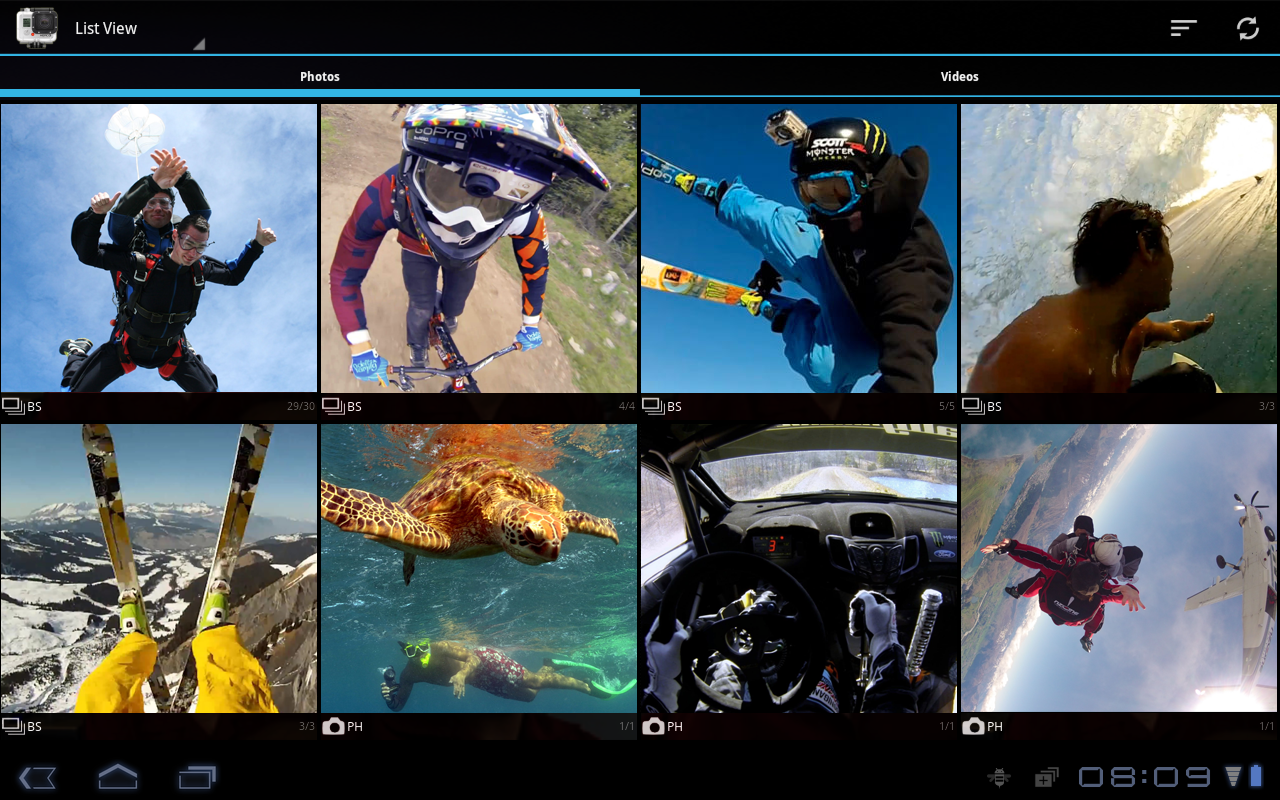
GoPro CamSuite Pro v1.8.0 APK

 Unleash the full power of your GoPro camera and take over control with GoPro Remote Control, use your smartphone as display and explore, download and share previously recorded media files (photos and videos) with the GoPro Media Browser or synchronize your media files automatically with Dropbox.

Premium Functions:
• Automatically synchronize your media files with Dropbox
• Adjust the playback speed of your videos.
• Select the storage location for your media files, if you use external SD cards
• Batch download multiple media items or full albums in the background
• Sort media items dynamically, e.g. descending based on their recording date
• Filter media items based on their type or compatibility

GoPro Remote is not only an alternative remote control for the official GoPro App in order to control all available editions of the full HD GoPro action cameras, it also gives your remote access to your SD card to look at recorded pictures or to play recorded videos. The application supports all GoPro specific settings, it comes with automatic GoPro model detection and provides an integrated live preview as well as external preview options for VLC and MX players. Pro users can also download and share media files with their friends.

Media Browsing

The Media Browser provides access to the GoPro's SD card in order to play previously recorded videos or to have a look at your photos. By default, the following GoPro Hero action cameras that run the latest firmware update are supported (Hero 2, Hero 3 White, Hero 3+ Silver and Hero 3+ Black Edition).

The Media Browser does not stream *.MP4 files directly as the files are simply too huge and the camera's WiFi capability is limited. Instead, the Media Browser can access so called Low Resolution Video files (*.LRV), which are created by the camera. However, the current release of GoPro's firmware does not create these files for every video. Based on your protune setting, it might be possible that these files are not created by the camera. As a result, you will not be able to play these videos with this application.

Live Preview

The internal live preview is based on a protocol to support as many devices as possible. As a result, some devices might encounter delays when enabling the preview. This is because Full HD video streaming is expensive and has to be done on the hardware layer. In addition, we also support external players to display your GoPro live preview in full screen mode. Therefore, we linked our application to the VLC Player as well as the MX Player, which have to be installed first:

VLC Player for Android: http://goo.gl/b4Zgi
MX Player for Android: http://goo.gl/v8sUi

Features

All available GoPro cameras, including Hero HD2 cameras are supported. The app is designed to detect the camera model automatically:
• GoPro Hero HD3+ Black Edition
• GoPro Hero HD3+ Silver Edition
• GoPro Hero HD3 Black Edition
• GoPro Hero HD3 Silver Edition
• GoPro Hero HD3 White Edition
• GoPro Hero HD2 with WiFi Backpack
• Setting Description: For those of you who do not know the user manual by heart, every setting is equipped with a short text telling you when to use it and how it affects the current camera setup

What's New

• Support for Hero 3+ models
• Automatic media synchronization with Dropbox powered by GoPro Cloud Sync
• Advanced media browsing (HD download, playback speed)
• Advanced media filtering (dynamic sorting, hide file types or unsupported files)
• Delete single photos, entire albums or a combination of selected items
• Get advanced information about your media files such as video length, resolution

Requirements: Android 2.1+
File Size: 14.9 MB
Download Link: 4shared.com
{[['']]}

VLC Direct Pro Free v6.6 APK

YES!
After a lot of work, we have released the new version of VLC Direct Pro Free,
and this time is FREE with all the PRO features enabled!
* Remote control VideoLan VLC from your Phone/Tablet (play, pause, stop, volume, fullscreen, change video/song, dvd menu control, change audio tracks, change subtitle tracks, etc.)
* Streaming from Android to Computer (Video, music and photos)
* Its internal video player allows streaming content from the Computer to Android (Video, music and photos)
* Subtitles supported
If you have any question, request or complaint, please don't give the app a low rate, just send us an email and we will answer within a few hours (sometimes within a few minutes!). Be sure we will do our best to solve your specific problem.
To configure your VLC, just download and run the following script in your PC (only windows):
(Remember running it as administrator the first time: Right click on it and then "Run as Administrator")
http://vlcdirect.blogspot.com/2012/10/configuration-script-download.html
Windows will ask you permission to make changes in the VLC folder and allow VLC to access the network. Those actions are necesary for proper function, please allow them.
What does the script?
Basically, It starts VLC with its web interface enabled, and passes it some parameters to improve codec finding and rtsp streaming performance.
If you don't use windows, you can follow this connection guide:
http://vlcdirect.blogspot.com/2011/05/vlc-direct-manual-de-configuracion.html
Important notes about VideoLan VLC Versions:
RECOMMENDED VLC VERSIONS: 2.1.0, 2.0.8, 2.0.7, 2.0.6, 2.0.5, 2.0.3, 2.0.2, 2.0.0, 1.1.11
NOT RECOMMENDED VERSIONS: 2.0.4, 2.0.1, versions older than 1.1.11

if you need any specific version of VLC, you can find it here:
http://download.videolan.org/pub/videolan/vlc/
supported formats: avi, flv, mp4, mp3, mkv, wmv, jpg, mpeg, mpg, rmvb, m4v, mov, 3gp, ts, vob. (Some videos in these formats might not work because sometimes VLC can't transcode them into an android supported format -mp4 or 3gp-)
If you are looking for the Official VLC Mobile Team Player, you can find it here:
https://play.google.com/store/apps/details?id=org.videolan.vlc.betav7neon
more info: http://www.vlcdirect.com
e-mail: vlcforandroid@gmail.com

What's New
Use VLC 2.1.0, 2.0.8, 2.0.7, 2.0.6, 2.0.5, 2.0.3 or VLC 2.0.2.
Avoid VLC 2.0.4 and 2.0.1... They have streaming codecs broken!
check our blog (http://www.vlcdirect.com) or send us an email if you experience any problem.
Version 6.6
Support for the recenly released VLC 2.1 completed
Improved Connection Wizard for VLC 2.1
Samsung 2.3 phones FC bug fix
HTC 3.1 tablets ARN bug fix
Other minor bug fixes

Requirements: Android 2.0+
File Size: 1.5 MB
Download Link:  4shared.com
{[['']]}

Infolinks 2014


Recommend us in Google+


Visit us on Facebook

 
Copyright © 2013 | Bisag Unsa - All Rights Reserved

Please like Bisag Unsa

Please wait..20 Seconds Close